

How to Sanitize Your Phone the Right Way
TL;DR
-
Phones carry a lot of bacteria, and wiping them is not enough. Proper sanitization is what actually removes germs without damaging your device.
-
The safest methods are 70% alcohol wipes, a microfiber cloth with alcohol, or a UV-C phone sanitizer machine, which is the easiest for daily use.
-
The key is consistency. Sanitize your phone daily and clean accessories like cases and earbuds too.
Phones pick up countless tiny organisms every single day. A swipe across the screen captures germs just like a lab dish would. Bathroom visits add to the mix each time. Sharing devices moves microbes from one person to another without notice. Surfaces in public spots leave behind invisible traces. Restaurant tabletops are silent contributors too. Hands often rinse off during daylight hours. Phones sit untouched by soap or wipes most days. Face contact happens constantly, even with grime present.
But here is the part most people do not know: using the wrong cleaner on your phone might backfire. Harsh chemicals eat away at the screen’s shield, weakening water resistance, leaving behind a finish that pulls in smudges and breeds germs with every touch.
So before you reach for whatever is under the sink, here is what actually works and what to avoid.
Cleaning vs. Sanitizing: Why the Difference Matters
A smudge-free display starts with wiping away what you can see. Yet clarity to the eye doesn’t touch the tiny life clinging underneath. Fingerprint removal improves appearance - little else follows from it.
Every time you touch something (door handles, kitchen surfaces, even money) you carry unseen hitchhikers back to your screen. What matters most isn’t wiping away grime but stopping germs where they live. A real sanitation doesn’t shift microbes aside; it ends their survival on contact. Your method must break down threats, not move them around like dust across glass.
Most people clean their phones occasionally. Consistent disinfecting? Almost nobody does that. Here is how to do it correctly.
What Not to Clean Your Phone With
This is the part most guides skip, yet it's the one that counts when you sanitize your phone often.
Avoid these practices according to Apple and Samsung:
-
Bleach
-
Hydrogen peroxide
-
Vinegar
-
Aerosol sprays
-
Window cleaners
-
Alcohol wipes above 70% concentration
Touchscreens usually have a special finish that fights grease from fingers. This invisible shield makes swiping smoother. When strong cleaners go on the glass, they eat away at that protection. Without it, marks show up faster. Sanitizing takes more effort. The surface wears down quicker over time.
A splash of vinegar might seem like a smart fix, yet its acid eats away at aluminum and wears down plastic corners. Bleach? It hits hard, far too harsh for the delicate parts inside everyday gadgets. Hydrogen peroxide acts strong - rough on electronic surfaces meant to last. Alcohol swabs with high strength pull moisture from plastics, leaving them stiff and prone to cracking after many uses.
Here's a tip: anything powerful enough to clean your countertop might damage your phone. Start thinking about gentler options instead.
Fibers stick around after wiping with paper towels, plus those rough fabrics leave marks on glass. Scratches show up where the screen meets the edge, while fuzz sneaks into tiny openings near sound holes and plug slots.
How to Disinfect a Phone: Three Methods That Actually Work
Method 1: 70% Isopropyl Alcohol Wipes
This approach works when done correctly - Apple and Samsung agree on that much. What matters most is how it's carried out, nothing more, nothing less.
What you need: A single wipe should contain precisely 70% isopropyl alcohol. Too high a strength disappears before doing its job. Anything under 60% might fail to stop germs consistently.
How to do it:
-
Power off your phone and unplug it from any charger
-
Remove the case
-
Gently wipe all surfaces, including the screen, back, sides, and edges, with a single wipe
-
Do not apply the wipe directly to ports, speaker grills, or openings
-
Allow the phone to air dry completely before powering it back on
-
Wipe the case separately with the same method and allow it to dry fully before reattaching
The limitation: Only spots you actually wipe get sanitized. Areas near buttons and openings often slip through. Over time, regular use of sanitizing wipes may weaken protective screen layers. These coatings resist fingerprints but degrade slowly. Always refer to what the maker says about how often it’s safe to sanitize.
Method 2: Microfiber Cloth with a 70% Alcohol Solution
Samsung specifically recommends this approach: A wipe with a soft microfiber fabric works well when it's just slightly wet with liquid containing 70% isopropyl alcohol, used gently across all surfaces.
How to do it:
-
Power off your phone and remove the case
-
Lightly dampen, not soak, a clean microfiber cloth with 70% isopropyl alcohol
-
The cloth should be barely moist, not dripping
-
Wipe the front, back, and sides in smooth, even strokes
-
Never spray liquid directly onto the phone, as moisture that enters ports can cause corrosion or short circuits
-
Allow to air dry for at least 60 seconds before powering back on
Microfiber cloths are gentler on screen coatings than wipes and less likely to leave lint or residue. This is a good option for daily santizing when done carefully.
Method 3: A UV-C Phone Sanitizer Machine
For households where phone hygiene needs to be a daily habit rather than an occasional project, a UV-C phone sanitizer machine is the most practical and sustainable option.
How it works: UV-C light at the correct germicidal wavelength disrupts the DNA of bacteria and viruses, preventing them from reproducing. A phone sanitizer machine encloses your device in a sealed chamber where UV-C light reaches all exposed surfaces simultaneously: front, back, and sides. No chemicals. No liquids. No risk of coating damage. No technique required.
How to do it:
-
Place your phone inside the sanitizer chamber
-
Close the lid and press start
-
In approximately 10 minutes, your phone is sanitized and ready to use
That is the entire process. No prep, no drying time, no surfaces to miss. Many PhoneSoap models include a built-in USB charging port, so your phone charges while it sanitizes, making it easy to build into a nightly routine without adding any extra steps.
Why this method works for busy households: The biggest barrier to consistent phone hygiene is not knowledge, it is friction. If sanitizing your phone requires finding the right wipes, getting the moisture level right, and carefully wiping around every button and port, it will not happen every day. A UV-C phone sanitizer machine removes every point of friction. You place the phone inside. It does the work.
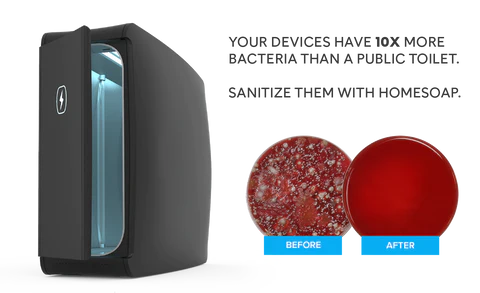
Independent tests conducted by lab technicians, university researchers, and consumers using home culture kits consistently confirm that a single UV-C cycle eliminates bacteria from phone surfaces. Before-treatment Petri dish samples show bacterial growth. Post-treatment samples show near-zero.
How Often Should You Sanitize a Phone?
One time each day works well for regular use. Tie it to something you already do, so it does not seem like extra work. Drop your phone in the phone sanitizer machine when arriving back at home. Or leave it there during charging through the night. That way, doing it becomes automatic.
Bumping up how often you disinfect makes sense when days involve crowded spots. Riding buses or trains piles on germs, so does hitting the gym midday. Doctor waiting rooms add risk, especially when coughs start spreading. Classrooms fill fast with sniffles once seasons change. Cold months turn shared air into a problem - more contact means more exposure.
When kids get home from school, sanitizing their phones takes almost no extra time. Done right after homework, it stops germs before they spread. A quick wipe becomes a quiet habit. This small step keeps more than just screens disinfected. It changes how dirt moves through the house. At day's close, attention shifts without effort. The device gets wiped while jackets come off. Little moments add up differently now.
Do Not Forget About Items That Touches Your Phone
Sanitizing your phone handles part of the issue. Everything hooked to that device? That’s where the rest hides.
- Phone case: Remove and sanitize separately with every process. Bacteria pile up where the cover meets the device, especially if the material has grooves instead of a flat finish. Hit those inner surfaces with a wipe that contains 70% rubbing alcohol or another cleaner labeled safe for gadgets. Leave it out in open air until zero dampness remains, then snap it back on. Dryness matters most before putting it together again.
- Earbuds and headphones: Wipe ear tips with a microfiber cloth lightly dampened with isopropyl alcohol. Allow to dry fully before use. For over-ear cushions, use a barely damp cloth only and do not saturate foam or fabric materials.
- Charging cables: These get handled constantly and almost never sanitized. Run a wipe along the entire cable, not skipping near the ends where grime hides. Hands touch these wires nonstop, yet they stay forgotten during sanitation. Let air do its job, wait until fully dry. That stretch between phone and outlet needs care too.
Your Phone Should Be as Clean as Your Hands
You have already done the hard part. You are aware of the problem. Spotting that phones carry germs isn’t the issue. What trips people up is the daily effort - too much hassle, too little ease. Fixing it means cutting the small barriers, nothing more.
A damp piece of microfiber plus a wipe with 70% isopropyl alcohol sanitizes things fine. Yet staying on track often slips when tasks demand attention every time. This gap? It explains why families grab UV-C sanitizing boxes for phones: zero mixing, no wiping, never judging your method. Drop the device in at night. Wake up to disinfected tech, fully juiced. Missed spots cannot hide here. Steps vanish into habit.
A UV-C phone sanitizer fits where routines fall short. It handles the spot most hygiene habits miss. Clean hands, clean home - yet that device stays untouched. This machine reaches it. Light does the work. No wiping needed. The screen, the case, the crevices. Germs vanish fast. A final step for someone thorough. Protection completes here.
Wipe down your counters. Rinse your hands. Even your phone gets sanitized now.
Frequently Asked Questions
What is the safest way to sanitize a phone?
The safest method for daily phone sanitization is a UV-C phone sanitizer machine, which uses no liquids or chemicals and poses no risk to screen coatings or internal components. For manual sanitizing, 70% isopropyl alcohol applied with a microfiber cloth is the method recommended by both Apple and Samsung. Avoid anything above 70% alcohol concentration, bleach, hydrogen peroxide, vinegar, or aerosol sprays, as these strip the oleophobic coating on your screen and can damage phone materials over time.
How do you disinfect a phone without damaging it?
Start by turning the phone off, then disconnect it completely. A wipe made with 70% isopropyl alcohol works well for sanitizing. Instead of that, try a soft microfiber cloth barely wet with the same alcohol mix. Another way? Try using a UV-C sanitizer built just for phones. Never aim sprays at the screen or body - liquid inside can ruin parts. Paper towels might seem handy, yet they leave tiny scratches on glass. Cleaners meant for sinks or counters go too far, those formulas eat away protective layers. Harsh means harmful here - what handles grease likely harms coatings. So if it scrubs tile easily, set it aside.
How often should you sanitize your phone?
Sanitizing your phone once a day is a practical and effective target for most households.. When someone nearby has a cough or fever, do it more often. After riding crowded buses or standing in long lines, consider another round. Think about how many hands touch that screen every single hour. Most never wipe theirs at all. That one time you sanitize it? Already ahead. Seasons change, germs spread - tweak the rhythm then.
Is a UV-C phone sanitizer machine actually effective?
Yes, it works. Lab techs ran checks. So did university teams. Even regular users tried it at home with Petri dishes. Every test had similar outcomes. One round of UV-C wiped out germs on phones. Light at just the right wavelength messes up bacterial DNA so they cannot multiply. Phones left alone grew visible clusters in cultures. After going through a PhoneSoap session, almost nothing showed up. Places like hospitals rely on this kind of UV light too. Water plants use it. Air sanitizing systems apply it.
What should you never use to sanitize your phone?
Stay away from bleach, hydrogen peroxide or vinegar. They eat away at the oil-resistant layer on your screen. Aluminum and plastic parts can start to break down when exposed to aerosol sprays or strong window cleaners. Alcohol wipes that are more than 70% concentrated? They weaken waterproof seals little by little. Paper towels might seem harmless, yet they often leave tiny scratches behind. Even rough fabric cloths tend to shed fibers into charging ports and speaker holes. Big brands like Apple and Samsung warn about these exact items in their published care advice.
Want to learn more about how UV-C technology works? Visit the PhoneSoap FAQ. Questions? Drop them in the comments.

