
Getting started / PhoneSoap Wireless
Get started with PhoneSoap Wireless.
Welcome, and thank you for choosing PhoneSoap Wireless! Questions? Email cs@phonesoap.com or chat with us online — we are happy to help.
Getting started
How to use PhoneSoap Wireless

1
Plug it in
Plug in your PhoneSoap Wireless using the included cable and wall adapter.

2
Load your phone
Place your phone face-up, centered on the pad. To charge wirelessly, remove your phone's case first.

3
Close the lid
Close the lid to begin the cycle.

4
Done in 10 minutes
After 10 minutes, remove your freshly sanitized phone.
Frequently asked questions
Can I leave my case or screen protector on my phone?
Yes! That is the part you touch most, so we actually encourage you to leave them on so they get sanitized too.
When I close the lid after a cycle, it starts another one. Do I need to unplug it?
Nope. PhoneSoap is designed so your phone always goes into a freshly sanitized space. It does not use heat, so it is safe to let it run another cycle. It uses very little energy, and the bulbs are covered by a lifetime bulb warranty.
How do I "lock" my phone?
Make sure your screen is turned off. On most smartphones there is a side button you press to turn the screen on and off. Locking also keeps UV-C light from registering as a "ghost" touch on the screen.
What else can I put inside PhoneSoap?
Anything that fits and is dry - credit cards, keys, earbuds, a smartwatch, and more. Our efficacy claims are for hard, non-porous surfaces.
Does it charge my phone wirelessly?
Yes. Set your phone face-up on the Qi pad inside the bay. Wireless charging works only with the case off your phone - thick cases block it. You can leave the case on just for sanitizing. There is also a USB port to charge accessories.
I see a red light. What does it mean?
A red light usually means the bulbs have gone dormant. Leave the lid open in a well-lit room or natural light for 5-10 minutes, or shine a flashlight at the bulbs for a few minutes. If it stays red, a bulb may be cracked or burnt out, or the unit may be overheating — avoid back-to-back cycles. See our PhoneSoap troubleshooting guide for the full steps.
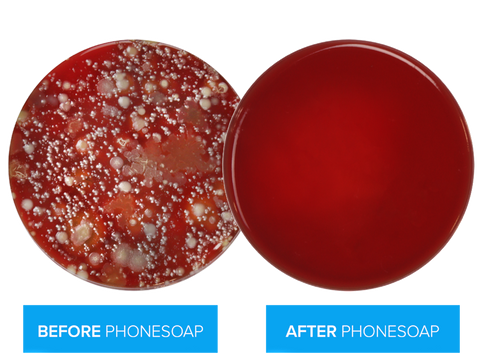
Clinically proven results.
Kills 99.99% of Staph, E. coli, and Salmonella — no heat, no liquid, no chemicals.
Still need a hand? We are happy to help.